
Best AI Tools for Video Editors to Improve Workflow in 2026. Video editing has changed dramatically over the last few years. Tasks that once took hours can now be completed in minutes with the help of artificial intelligence. Whether you’re a YouTuber, filmmaker, social media creator, marketer, or freelance editor, AI is becoming an essential part of modern production.
The challenge is not finding AI tools. There are hundreds available today. The real challenge is choosing the best AI tools for video editors that actually save time and improve quality. Some tools automate repetitive tasks, while others help generate captions, remove background noise, create highlights, or even produce entire video sequences.
In this guide, you’ll discover the most useful AI-powered tools available today and learn exactly how they can improve your workflow.
Why AI Is Transforming Video Editing Workflows
Video editors often spend a large portion of their time on repetitive work. Trimming clips, organizing footage, removing mistakes, generating subtitles, syncing audio, and creating multiple versions for different platforms can be exhausting.
AI changes this process by acting like a highly efficient assistant. Instead of manually completing every task, editors can automate many routine processes and focus on creativity and storytelling.
The biggest advantage of AI is speed. A project that previously required several hours of editing can often be completed much faster. AI also reduces human error and helps creators maintain consistency across multiple projects.
Another major benefit is accessibility. Editors with limited experience can now produce professional-quality videos using intelligent tools that simplify complex editing processes.
How to Choose the Best AI Tools for Video Editors
Focus on Your Biggest Workflow Bottleneck
Before purchasing any software, identify where you spend the most time.
Do you struggle with editing interviews? You may need transcript-based editing. Do you create social media content? Automatic clipping tools might be more useful. If you spend hours adding subtitles, caption-generation software should be your priority.
The best AI solution is the one that solves your biggest problem first.
Look for Automation Features
Strong AI video editing software should automate repetitive tasks such as:
- Transcription
- Caption creation
- Scene detection
- Audio cleanup
- Background removal
- Highlight extraction
- Video resizing
The more repetitive work the software handles, the greater the return on investment.
Consider Ease of Use
Some AI tools are designed for beginners, while others target professionals. If you’re new to editing, choose tools with intuitive interfaces and simple workflows.
Professional editors may prefer advanced platforms that provide greater control while still offering AI assistance.
Best AI Tools for Video Editors
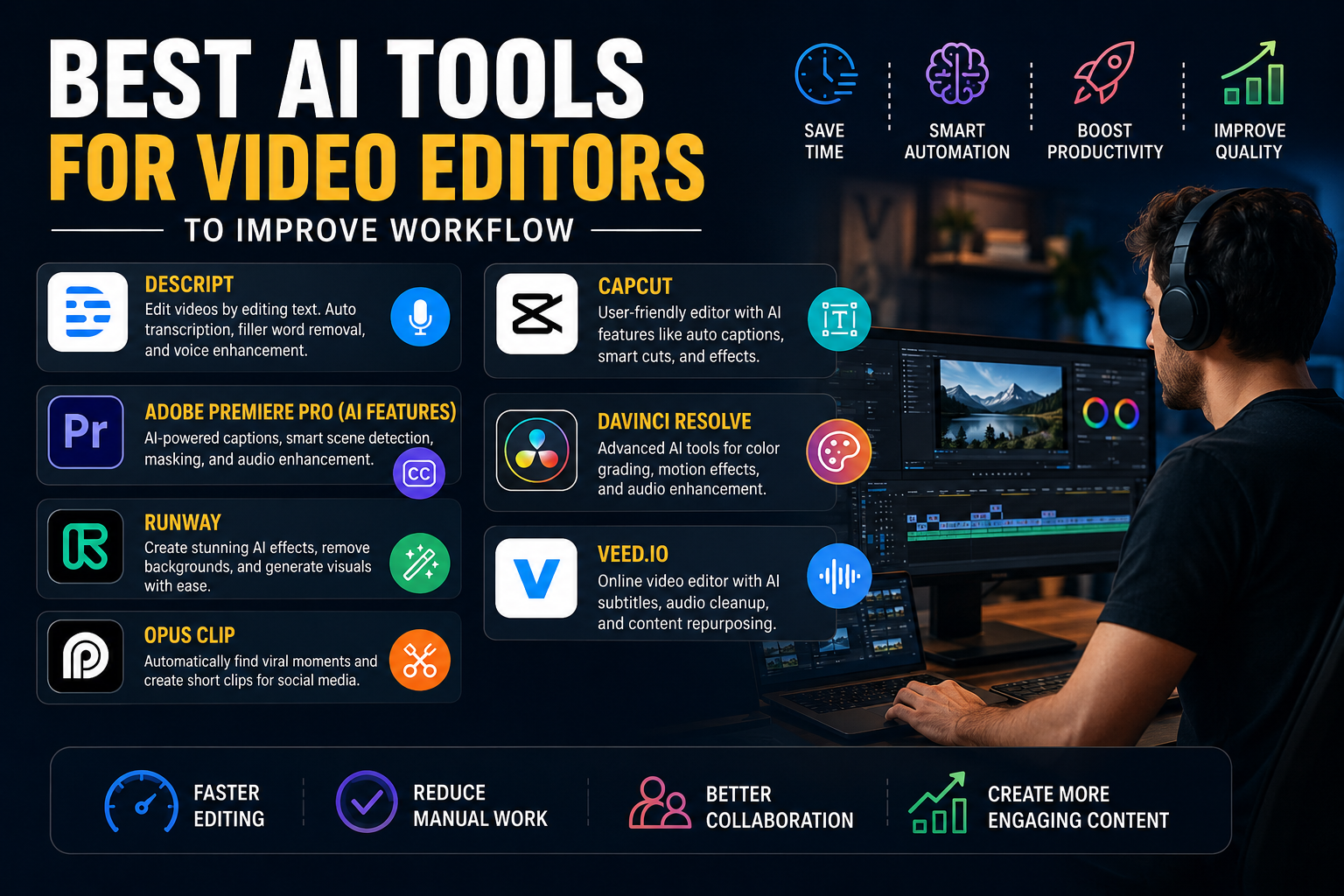
Descript: Best for Transcript-Based Editing
Descript has completely changed how many creators edit videos. Instead of editing on a traditional timeline, users edit video by editing text. The software automatically transcribes your footage and allows you to cut sections simply by deleting words from the transcript.
Key features include:
- Automatic transcription
- Filler word removal
- AI voice enhancement
- Eye contact correction
- Podcast editing tools
This makes Descript ideal for podcasters, educators, interview editors, calculator tools, and YouTubers who work heavily with spoken content.
Adobe Premiere Pro AI Features
Adobe continues integrating AI into Premiere Pro through its Sensei technology. Recent updates have introduced faster masking, smarter caption tools, and workflow improvements that reduce manual editing work.
Benefits include:
- Automatic captions
- Smart scene detection
- AI-assisted masking
- Audio enhancement
- Professional editing environment
For editors already using Adobe Creative Cloud, Premiere Pro remains one of the most powerful solutions available.
Runway: Best for Creative AI Effects
Runway is known for pushing the boundaries of AI-powered creativity. It offers advanced visual effects that previously required specialized skills.
Editors can use Runway to:
- Remove backgrounds
- Generate visual effects
- Create AI-generated footage
- Enhance video quality
- Produce cinematic content
Runway is particularly valuable for creators who want to experiment with cutting-edge visual storytelling.
Opus Clip: Best for Content Repurposing
Long-form content contains dozens of potential short-form clips. Finding them manually takes time.
Opus Clip automatically analyzes videos and identifies moments that are likely to perform well on social media. It can create vertical videos, add captions, and prepare content for platforms like TikTok, Instagram Reels, and YouTube Shorts.
This tool is especially useful for marketers, coaches, podcasters, and business owners.
CapCut: Best Free AI Video Editor
CapCut has become incredibly popular because it offers powerful AI features without a significant cost barrier.
Features include:
- Auto captions
- Smart cut tools
- Background removal
- AI effects
- Social media templates
Many creators start with CapCut because it combines simplicity with surprisingly advanced capabilities.
DaVinci Resolve: Best for Professional Editors
DaVinci Resolve continues to add impressive AI functionality. New features include intelligent media organization, motion deblur, AI sharpening, and speech-related tools that help streamline professional workflows.
Editors benefit from:
- Professional color grading
- Advanced audio tools
- AI-assisted organization
- Motion enhancement
- High-end production features
For professionals who need maximum control, DaVinci Resolve remains a leading choice.
VEED.io: Best for Fast Online Editing
VEED.io is a browser-based platform that focuses on speed and simplicity.
Its AI features include:
- Subtitle generation
- Audio cleanup
- Content repurposing
- Screen recording
- Team collaboration
This makes VEED an excellent option for businesses and creators who need quick turnaround times.
Building an Efficient AI-Powered Video Editing Workflow
The most successful editors do not rely on a single AI tool. Instead, they combine multiple tools into a streamlined workflow.
Video editing workflow automation
Step 1: Organize Footage
Start by importing and organizing footage using AI-powered tagging and search features available in modern editing software.
Step 2: Transcribe Content
Use Descript or a similar platform to generate transcripts and identify important sections quickly.
Step 3: Clean Audio
Apply AI audio enhancement tools to remove background noise and improve voice clarity.
Step 4: Create the Main Edit
Use Premiere Pro, DaVinci Resolve, or CapCut to assemble the final story.
Step 5: Generate Captions
Add captions automatically using AI rather than creating them manually.
Step 6: Repurpose Content
Use Opus Clip or similar tools to create short-form clips from long-form content.
Step 7: Final Review
Human creativity remains essential. Always review AI-generated edits before publishing.
Common Mistakes When Using AI Video Editing Tools
One of the biggest mistakes editors make is assuming AI can replace creative judgment. AI is excellent at automation, but storytelling still requires human insight.
Another common issue is over-automation. Excessive use of AI effects can make videos look artificial and less engaging.
Editors should also avoid using too many tools at once. A focused workflow with a few carefully selected applications is often more efficient than juggling dozens of platforms.
Finally, always fact-check AI-generated captions and transcripts. While accuracy has improved significantly, occasional mistakes still occur.
The Future of AI in Video Editing
The future looks exciting for video editors. AI is becoming increasingly capable of understanding context, identifying key moments, and assisting with complex editing decisions.
Researchers are actively developing systems that combine video understanding with editing operations, potentially creating even more intelligent workflow assistants in the coming years.
However, creativity remains the defining factor. The most successful editors will be those who combine human storytelling skills with AI efficiency.
Instead of replacing editors, AI is becoming a powerful creative partner.
Conclusion
The best AI tools for video editors are not necessarily the newest or most expensive. The best tools are the ones that remove friction from your workflow and allow you to focus on creativity.
Descript excels at transcript-based editing, Opus Clip simplifies content repurposing, CapCut provides impressive free features, Premiere Pro offers professional-grade AI assistance, Runway delivers creative effects, and DaVinci Resolve combines advanced editing with powerful automation.
As AI continues to evolve, editors who learn how to integrate these technologies into their workflow will gain a significant advantage in speed, productivity, and content quality.
Frequently Asked Questions
1. What is the best AI tool for beginner video editors?
CapCut is often the best choice for beginners because it offers powerful AI features with a simple interface and affordable pricing.
2. Can AI completely replace video editors?
No. AI can automate repetitive tasks, but creative storytelling, pacing, and artistic decisions still require human expertise.
3. Which AI tool is best for YouTube creators?
Descript and Opus Clip are excellent choices because they simplify editing, transcription, and content repurposing.
4. Is AI video editing software worth paying for?
Yes. If it saves several hours of work each week, the productivity gains often outweigh the subscription cost.
5. What is the biggest benefit of AI-powered video editing tools?
The biggest benefit is workflow automation. AI reduces repetitive tasks, allowing editors to spend more time on creativity and strategy.
AI video editing software, automated video editing, AI content creation tools